
Extending Computer Science Concepts and Skills
Nested If Statements

MINDS ON
Even though you might not be aware of it, one of the main concepts you’ve been learning about so far is something called program control.
Program control includes how a program executes its code, makes decisions and organizes its functions. It is not just related to how the code is executed, but also which lines of code get executed as well.
Imagine that the following program is going to be executed.
Can you tell which line of code will be executed first? Second? Last?
Can you tell if there are lines of code that will not be executed?

Sequential Program Control
One of the first major concepts involved in program control is the idea that lines of programming code are executed sequentially, from first to last, top to bottom. That’s pretty simple, right?
Eventually you will write programs that bounce around a little bit (with subroutines, etc), but for now let’s just assume that the program executes line 1 first, then line 2, then line 3, etc.
Selection and Program Control
Selection involves having the computer make choices, and having programming code execute or not execute certain lines of code based on data or input. You have been implementing selection in your programs through the use of if-then-else statements.
The program below calculates the area of a rectangle and then outputs one of three statements:
- If the area is larger than 250: "That's a big rectangle!"
- If the area is larger than 150: "That's a medium-sized rectangle!"
- Otherwise: "That's a small rectangle!"
 Sequence, Selection and Your Brain
Metacognition involves “thinking about thinking.”
When you program a computer, you do a lot of thinking, so it’s interesting to stop and consider how you learn and how you think about computer programming.
- What is happening in your brain when you write a computer program?
- What is happening in your brain when you read through a computer program that someone else has written?
- Do you imagine little storage boxes for the variable values?
- Can you picture the output console or the form that has been designed?
- Do you keep all of this information in your head as you read each line of code?
- Do you believe that learning computer programming uses the mathematical components of your brain? Or your language learning components?
Your task is to read one of the following articles related to the brain, learning and computer programming. You can also search for your own article that is related to the same topic.

ACTION
You’ve had a brief introduction to selection through the use of if-then-else statements, comparison operators (<, >, <=, >=, ==, etc) and Boolean operators (&&, ||, etc).
It is now time to dig a little deeper to see the alternatives to if-then-else statements, and how if-then-else statements can be nested inside of each other to create really cool decision making structures and game play logic.
Switch Statements
Switch statements in Java are an alternative to the if-then-else statements.
They are useful when the decision being made is based on a single character, word or value. If the decision involves ranges, then a switch statement might not be ideal. For example, you would not use a switch statement for the following, because the condition involves a range of possible numbers:
if (mark >= 50)
{
System.out.println (“You passed!”);
}
else
{
System.out.println (“You passed!”);
}
Take a look at the following two programs.
They accomplish the same task, but the first one is written using the if-then-else statement, while the second one is written using a switch statement:
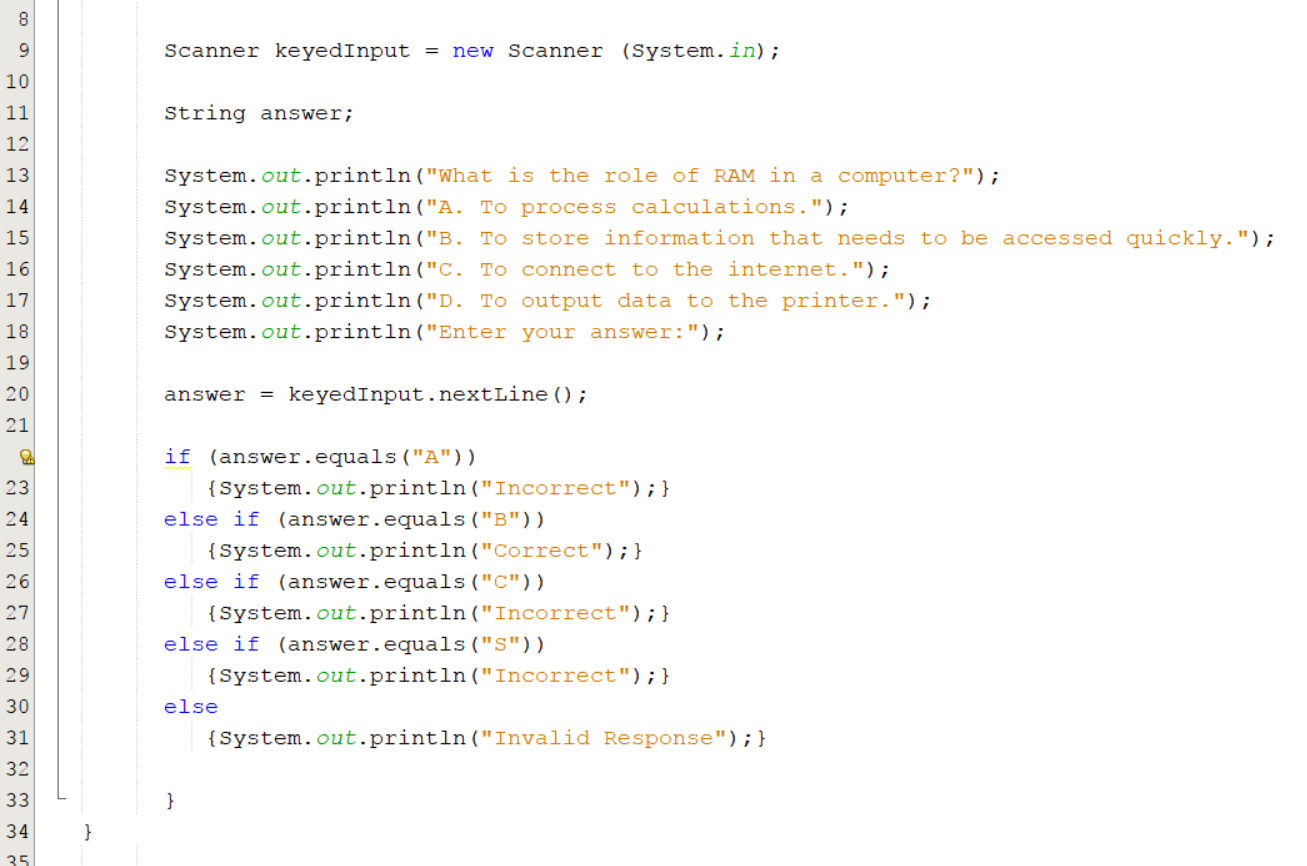
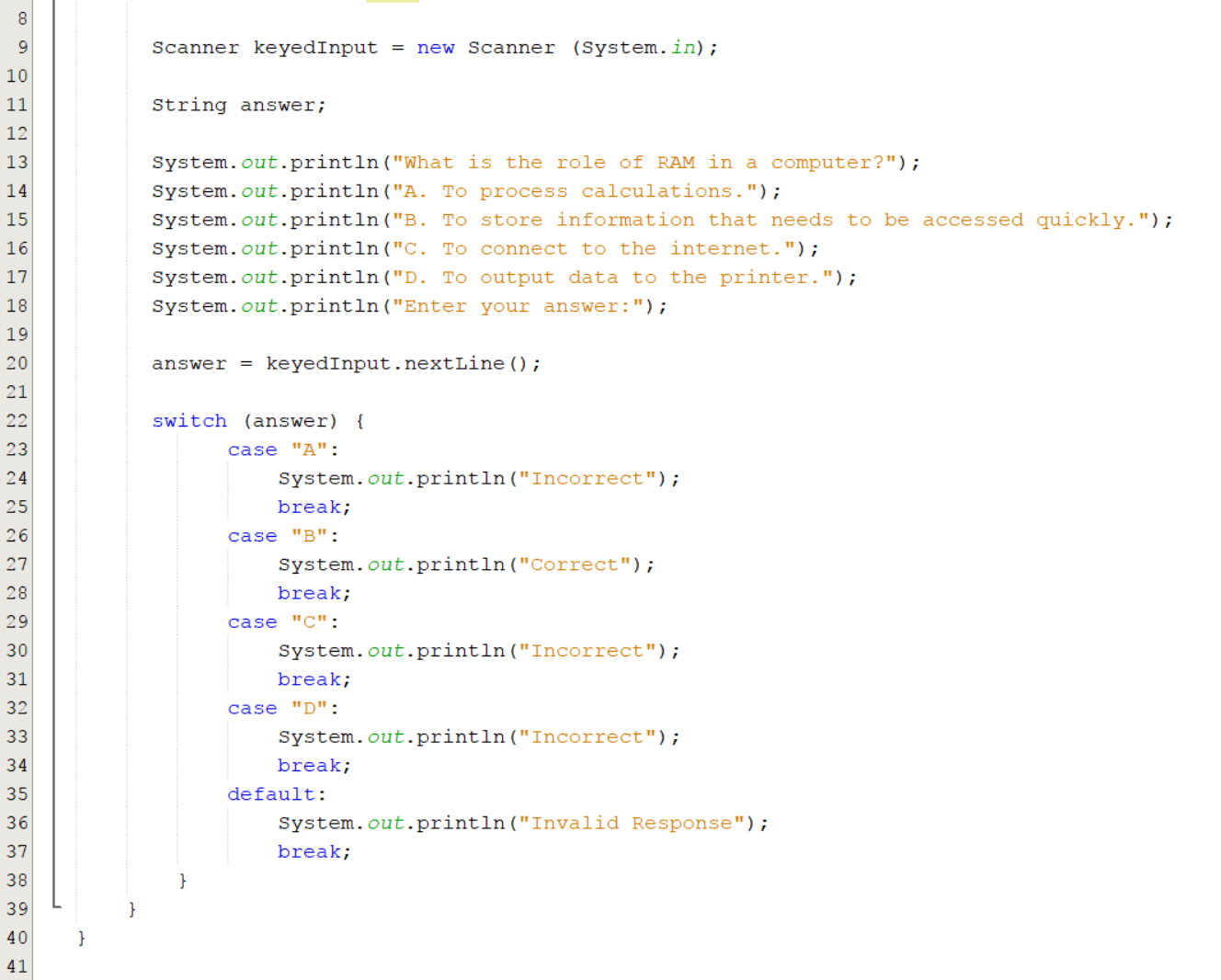
The switch statement above doesn’t change the program in terms of how it works; it only changes the program in terms of how the source code looks.
An advantage to using the switch statement is that some programmers feel it helps keep their programming code look a little more organized.
Case Fall Through
If you choose to use switch statements in your program, just make sure that you properly place the break statement at the end of each case.
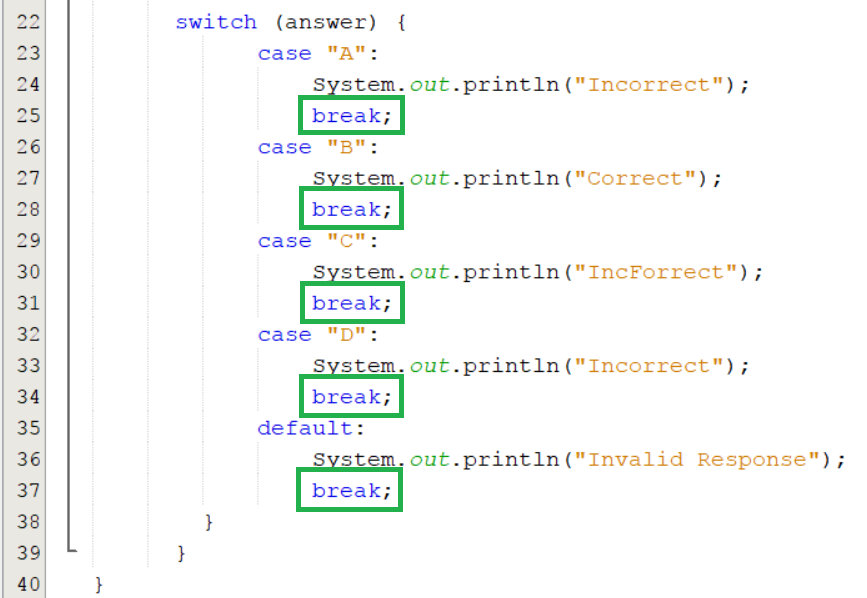
The break ensures that only one of the cases is executed. When the program reaches the “break;” in line 28, it then skips to the end of the switch statement (line 39). Without the break in each case, the program will execute the following case as well. This is called case fall-through.
Did You Know?
While switch statements aren’t great to use when your program needs to identify a range of values, they are still useful if two or three values all result in the same response. As an example, consider a multiple choice quiz where the user might enter an uppercase “B” or a lowercase “b” as their answer.
As a programmer, you would want both of these responses to be accepted as a correct response. This could be done with an if-then-else statement, or with a switch statement:
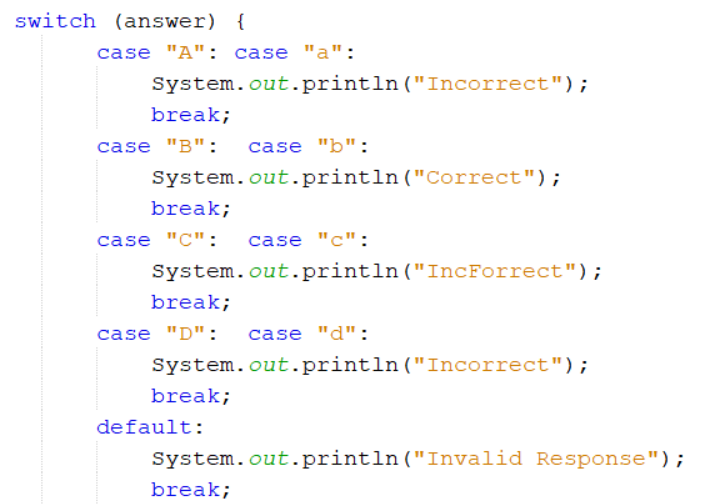
You may have noticed the default clause in the switch statements above. This default clause makes sure that if information other than A, B, C, or D is entered, then the user will be shown a message explaining that what was entered was an invalid response.
 Positive Practice
Your task is to create a program that outputs one of eight positive or inspiring quotes or messages to the user when a button is clicked.
The program should be designed with a jFrame form that includes
- a label on the top center of the form that says “Positive Practice.”
- a label with instructions.
- a button.
- a label to display the quote.
The form might resemble the following:
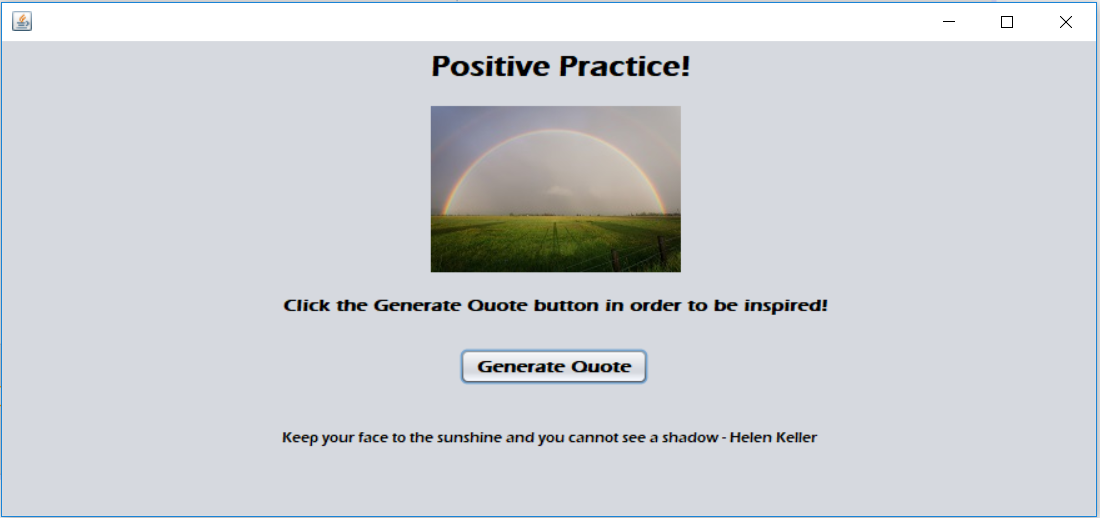
When the user clicks the "Generate Quote" button, the program should generate a random number between 1 and 8. The program will then output one of eight quotes or inspiring messages that you have found online.
Your program should use a switch statement to output a quote based on the random number generated, and it should include commenting for all components of the program.
Nested if-then-else Statements
A nested if-then-else statement is when an if-then-else statement is programmed inside of another if-then-else statement. Sounds a bit crazy, doesn’t it? It’s actually pretty cool, and allows the programmer to develop some really interesting programs.
As you continue to work with selection in your programs, you may want to think of if-then-else statements as leading to branches in your programs. With nested if-then-else statements, the branching gets more and more complex.
An example
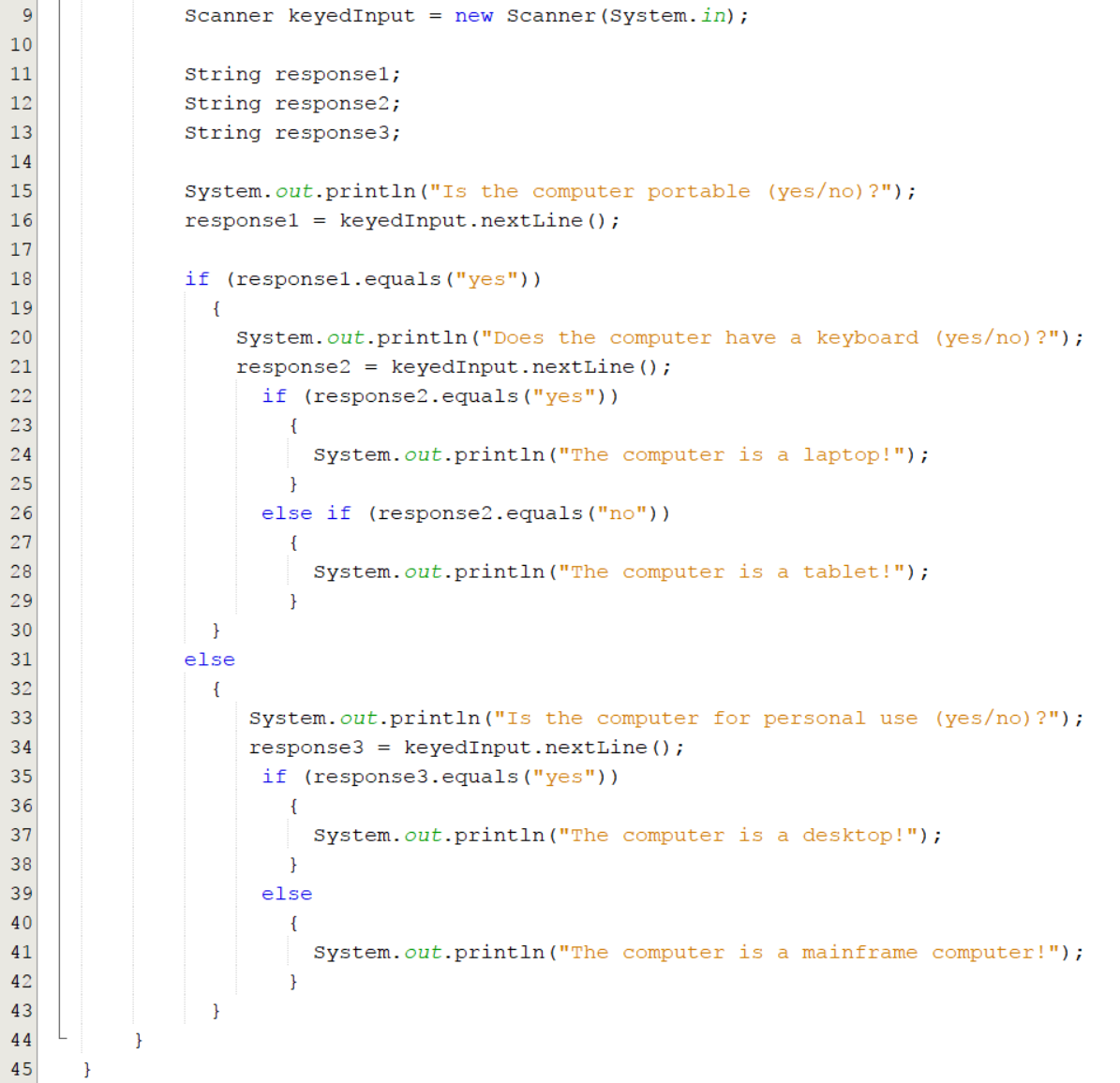
The flowchart below shows how a programmer might design a program that determines the type of computer a person is looking for. There are many more types of computers and sub-categories, but the following have been selected just to keep things simple:

Notice how the decision of whether or not the computer has a keyboard comes within the decision of whether or not the computer is portable.
To create the above program, the programmer has to insert if-then-else statements inside other if-then-else statements.
The code would resemble the following:
A Second Example
The diagram below shows how a person might determine what type of animal another person is thinking about. Notice that we haven’t included every single possible animal, since that would make this quite complicated and confusing.
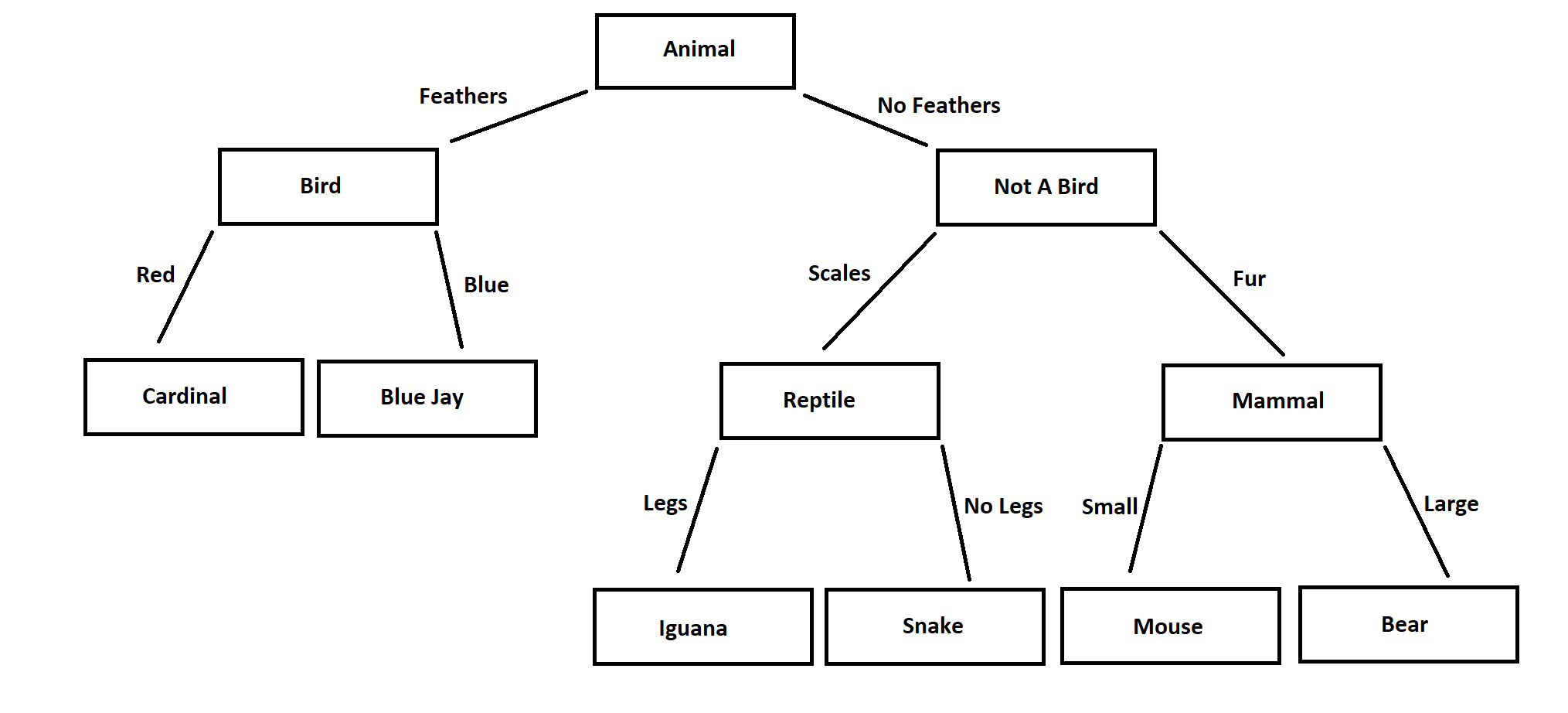
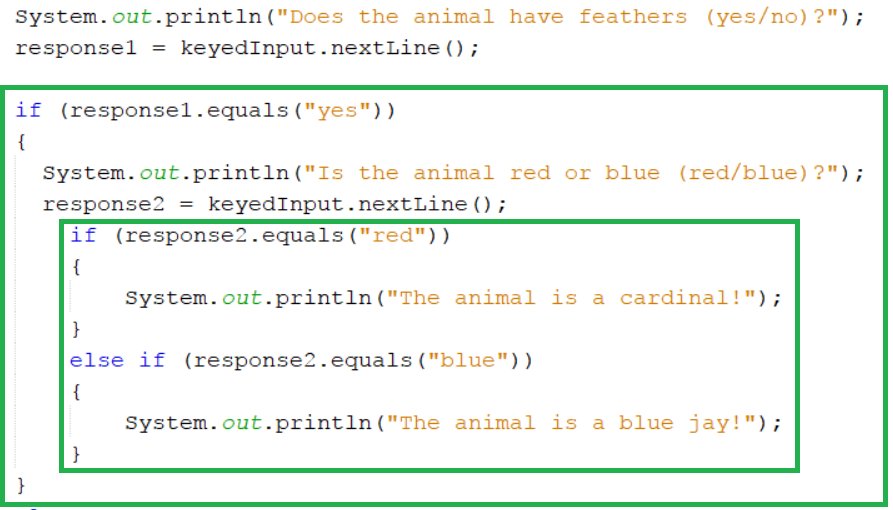
In the diagram above, the decision based on whether or not the animal is red or blue falls under the decision based on whether or not they have feathers. If you programmed this, it would mean that the if-then-else statement for bird colour would be nested inside the if-then-else statement for feathers.
In the diagram above, the decision based on whether or not the animal has scales or fur falls under the decision based on whether or not the animal has feathers. Then there is a decision on whether or not the animal has legs, and whether it is large or small.
This will mean you will have if-then-else statements nested inside other nested if-then-else statements. Wow!
The Importance of Indenting and Braces
Once you start to work with nested if-then-else statements, and you start creating larger programs, it is very, very important that you keep your programs organized.
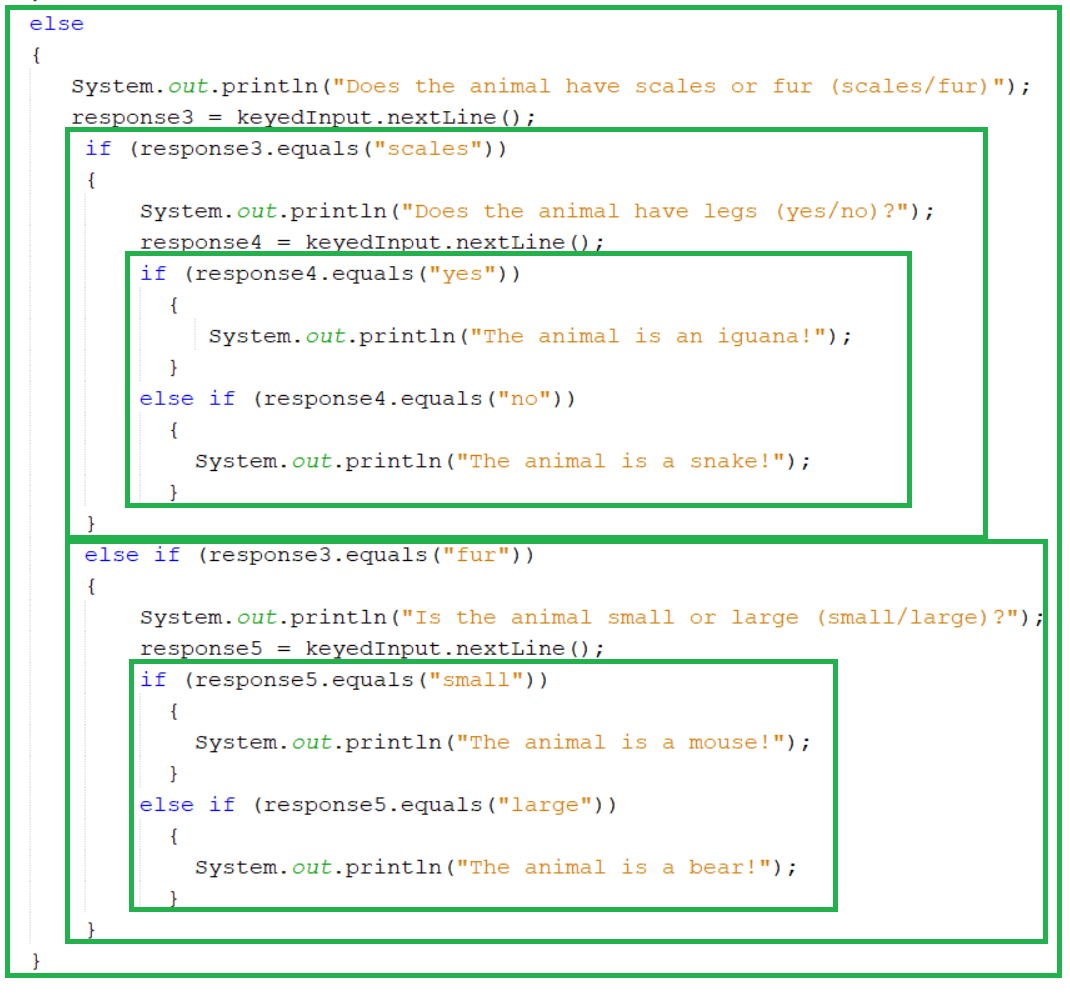
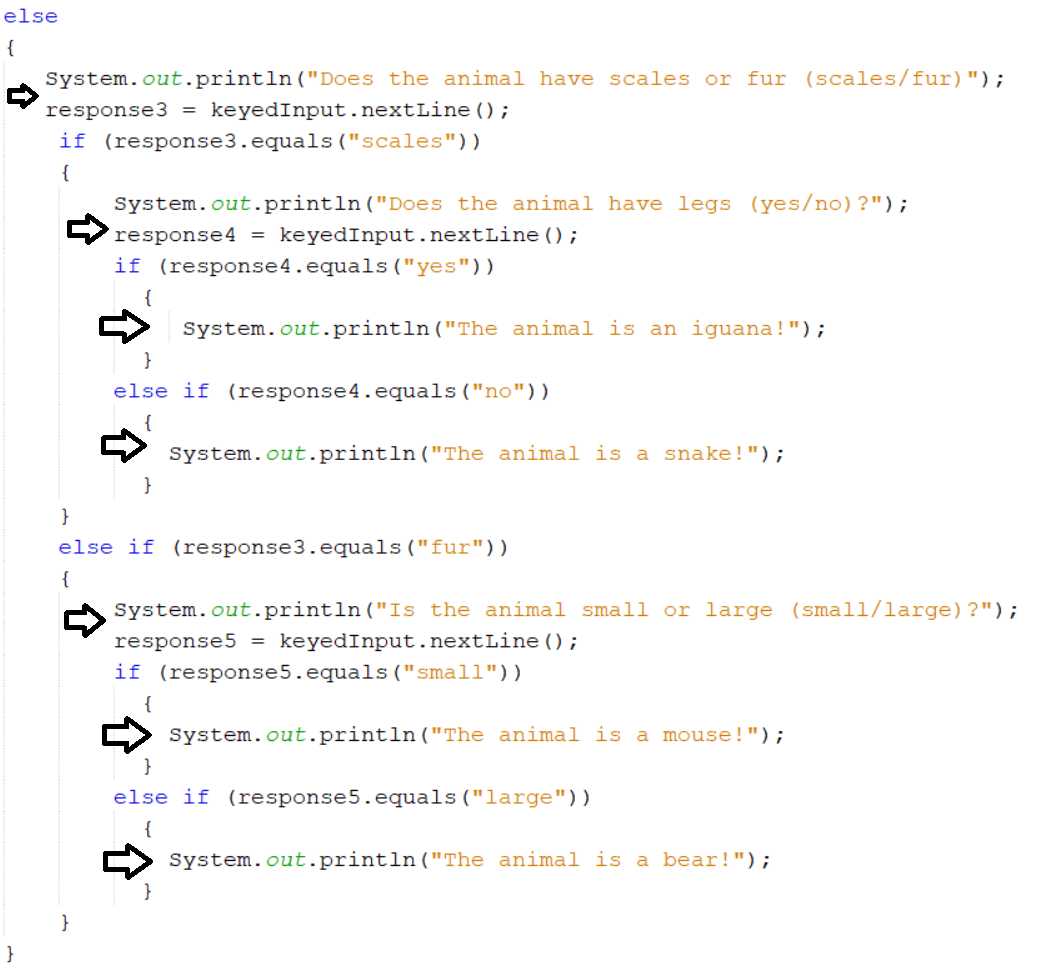
Indenting your code allows you to see which blocks belong to each other. A good example of this in practice is the if-then-else statements above.
Each statement that goes inside another if-then-else statement gets indented further to the right. Therefore, after every open curly bracket you have to indent the next line of code further to the right. Then after closing a curly bracket, the next line of code is no longer indented. This makes it easy to see the statements that are associated with each one:
Braces (or Curly Brackets)
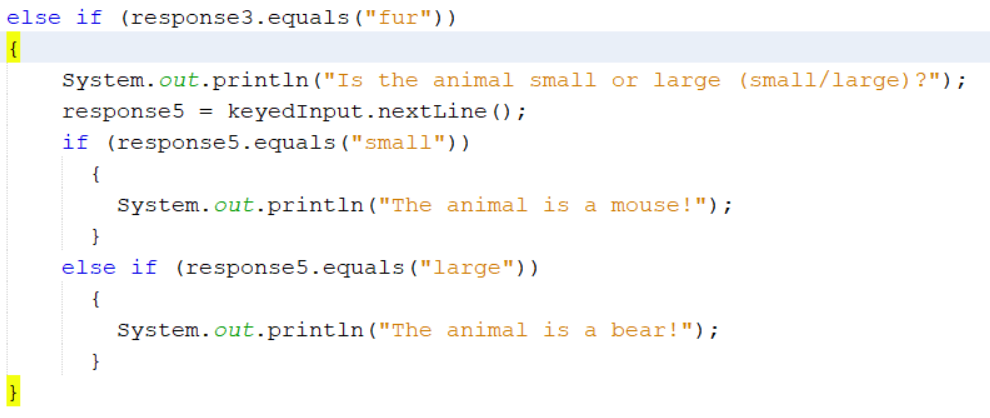
By now, you have probably figured out that the braces (also known as curly brackets) in Java are used to indicate where certain components or blocks of code start and end.
As an example, these braces (or curly brackets) are used to show the start and end of an if-then-else statement.

An opening brace “{“ always needs an associated closing brace “}”.
Programming Style and Organization … You are Not Alone!
The Netbeans IDE includes many features that help keep your programming code clear and organized. You may have already noticed that automatic indenting occurs, and often extra whitespace is added to your code as well.
Also, when you are using Netbeans, the closing brace is often added for you automatically after you type the opening brace.
You can also click on an opening or closing brace and it’s associated brace will automatically highlight for you. This is a very useful trick to stay organized and to figure out where components like if-then-else statements start and end.
Required Reading
If you want to view any links in this pdf, right click and select "Open Link in New Tab" to avoid leaving this page. (View the original article.)
Style Guides
A style guide is a set of rules or conventions that outline how a person’s programming code should work. Sometimes workplaces have their own style guide for their programmers. Other times, a programming language itself will have certain rules and conventions connected to its use.
You can read about some of the Java conventions in these style guides:
Programming Style
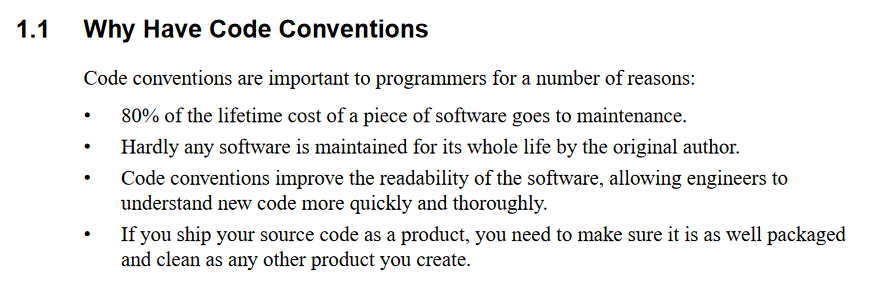
Programming style is a very important aspect of computer programs, especially when a group of developers are working with the same code. Without proper programming style, the team will have a difficult time understanding, editing and perfecting the program.
In order for you to become acquainted with programming style, complete the following tasks.
- Read through one of the following style guides, or find another one online that is applicable to the Java programming language:
- Take note of two or three programming style guidelines, rules or conventions that you found. You might include style tips for variable names, if-then-else statements, length of lines, or commenting. It is up to you to find important, relevant and useful tips to record in your notes.
- Reflect on why you think these particular tips or conventions would be important in Java programming.

CONSOLIDATION
Choose Your Own Adventure Game
"Choose Your Own Adventure" games and books have always been a popular source of entertainment for kids and adults. The idea behind them is that the user or reader gets to make decisions as he or she progresses through a story or game.

Each decision leads to new ones, and if you play the game or read the book twice, the outcomes can be entirely different based on the decisions made.
Dealing with various outcomes and alternatives in programs, flow charts and diagrams can be quite useful. The use of these tools help in the logic of the program (they will ensure that the program and choices make sense) and they speed up the actual coding of the program because the design is already established.
If you perform a web search for Choose Your Own Adventure Diagram, you might be surprised at the complexity of some of the stories being created. There are a number of alternative paths and outcomes.
Making a Choose Your Own Adventure Text-Based Game
Your task is to create a "Choose Your Own Adventure" text-based Java game.
Your game will present to the user a plot line and an initial decision to make. The user will enter in data to indicate his or her choice, and then the story should continue to present the user with plot twists, new characters and decisions. All choices should lead to final outcomes: some successful, others not.
You decide the context, theme or plot of your story. Some suggestions include:
- The user is an astronaut trying to reach Mars.
- The user is a pirate trying to discover a buried treasure.
- The user is a movie star living in L.A.
- The user is in a haunted house and must get out.
- The user has lost his or her phone and is trying to find it.
- The user is a country leader trying to make the best decisions for the people.
- The user is making career choices.
- The user is a driver in an ‘around the world’ rally race.
- The user is making life choices after winning the lottery.
- The user is a sales clerk trying to sell to customers.
- The user is a plane crash survivor trying to stay alive.
- The user is a crime fighter trying to solve a mystery.
- The user is a Canadian traveller trying to get home after a hurricane.
- The user is a Grade 9 student looking for his or her first class.
- The user is a Grade 11 math student deciding what method to use to factor a quadratic expression.
- The user is running a 3 team tournament to find a winner.
Start by making your flowchart first. Your game will involve several nested if-then-else statements and it will be much easier to write once you have already developed the program plot, decisions and logic.
You will be assessed on the flowchart, game, organization of code and programming style. Be sure to refer to the programming style guidelines and use proper variable names, spacing, indenting, commenting, etc.
Also, make sure that you make it clear to the users what information is needed to enter to make their decisions. If you ask them a yes or no question, should they respond with Yes, or yes, or YES, or Y? This has to be made very clear.
 Learning Goals and Success Criteria
 Learning Skills and Work Habits