
Portfolio
Over your educational career you have likely heard a lot about portfolios, and perhaps have developed, or begun to develop, one of your own. If so, please don’t stop! Your portfolio will likely be one of the most valuable assets you produce as you discover and analyse who you are, your opportunities, your career aspirations, and how you plan to get there.
In order to create a portfolio, you need to be able to answer the following questions
-
What exactly is a portfolio?
-
What forms do portfolios take?
-
What are the critical attributes of portfolios? (i.e., characteristics that all portfolios should possess)
-
What are the common components of all or most portfolios?
-
What are the purposes of developing and maintaining a portfolio? What are their value?
-
What are ways that portfolios can be used? In what situations are they beneficial?
-
How will creating a portfolio benefit me personally?
-
How might I use my portfolio as I continue my education, career planning, employment search, etc.?
Portfolios are simply an organized collection of items that illustrate the background, experiences, strengths, skills, aptitudes, preferences, and/or values of a person, as well as their learning and personal growth. A portfolio may be very general and address a wide variety of aspects of a person or it may be more focused, highlighting something quite specific, such as a talent, like visual art. Portfolios may also be career-focused, reflecting a person’s occupational aspirations, and, as such, include a body of evidence that supports the person’s suitability for a career, as well as his or her path.
Portfolios can take on many forms, though a folder or a tabbed binder might be what first comes to mind.
Electronic portfolios, however, are becoming increasingly popular and have the advantages portability and accessibility, as well as being easily updated, modified and shared.
Regardless of the type or purpose of the portfolio that a person constructs and maintains, there are some important commonalities amongst nearly all portfolios. For example, all portfolios:
-
serve a specific function, i.e., to document and illustrate facts about a person for a particular purpose (e.g., academic acceptance, job application and/or interview, job promotion, acquisition of a contract, etc.);
-
demonstrate learning. When constructing any form of portfolio, the author intentionally engages in self-reflection and discovery, recognizing and identifying his or her accomplishments and strengths, and, from that, typically deriving a sense of achievement. Such self-realization can be extremely beneficial when competing in today’s job market;
-
include aspects of reflection and self-assessment: e.g., Why is this item significant? What does the item say about me? What learning does it represent? What did I learn about myself? How can my personal attributes, as demonstrated by this item, benefit me and others in other situations or environments?
-
encourage the ‘author’ to make connections between various aspects of his/her current and prior experiences and learning;
-
encourage goal setting and effective planning.
Constructing a portfolio from scratch for the first time can be a daunting task. Many of us may not even recognize that we actually have significant personal experiences, strengths, skills, and values that are worth documenting. Many of us also struggle with selecting or creating an item that will demonstrate a particular experience, strength, skill, or value.
Throughout this course, you will be asked to complete tasks that will involve the creation of items that you will add to a career portfolio. (The process below provides a visual of this process). While these items, and the portfolio, will be beneficial as you discover who you are, your opportunities, your career aspirations, and how may get there, it is hoped that it will just be the start of a powerful resource that you will continue to build on and modify as you design and move through your future.
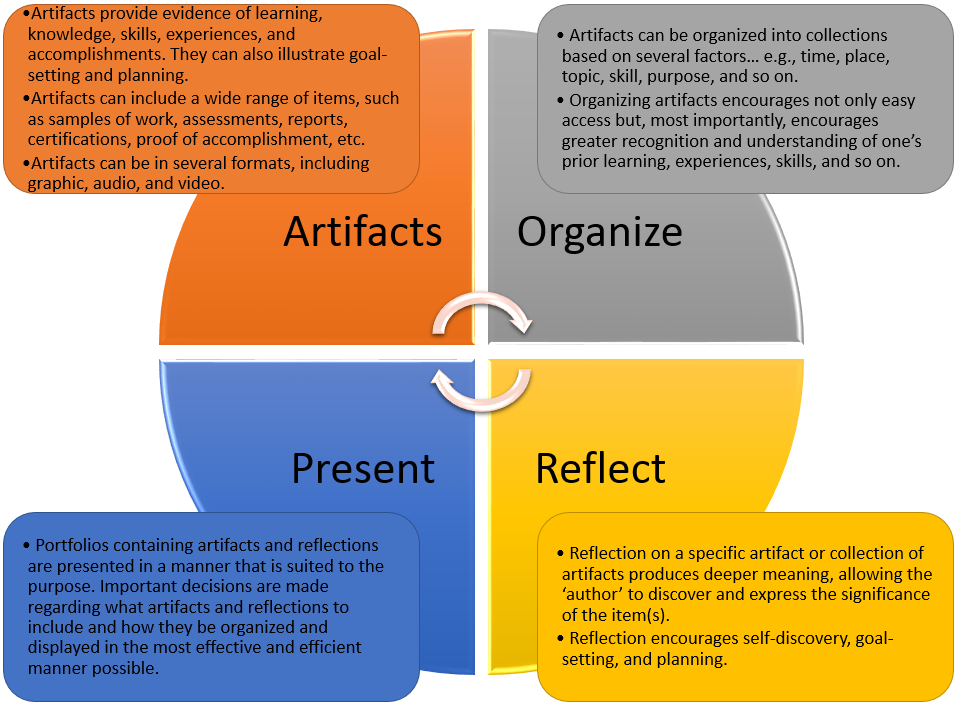
Creating a portfolio involves more than selecting, organizing, and presenting artifacts that provide evidence of learning, knowledge, skills, experiences and accomplishments. It involves the critical processes of reflection, goal setting, and planning that will have significant impact on your journey toward designing your future.
Brightspace ePortfolio
The Brightspace ePortfolio is a personal portfolio tool for storing, organizing, reflecting on, and sharing items that represent your learning. You can include items such as documents, graphics, audio files, videos, presentations, and coursework to demonstrate your improvement or mastery in certain areas.
… with an ePortfolio tool, all of your files are now available digitally, opening up the options for showcasing skills, knowledge and talents to include audio, video and other multimedia files. The Brightspace ePortfolio tools acts as a repository for all of your content/files: one giant “box” to store everything in. This provides you the opportunity to store as much as you need to over an extended period of time then pick and choose what you present to others.
You control what items you want to include in your portfolio, how they are organized, and with whom you want to share them. All of your content remains private to you until you decide it is time to share and how to share it. When you share items with your peers, mentors, or potential employers, you can give them permission to view items, edit items, see or add comments, and see or add assessments to receive feedback.
Brightspace ePortfolio Terminology
Artifacts
Artifacts are any digital items you that you upload into your ePortfolio or create inside of ePortfolio.
Typically, artifacts represent who you are, your experiences, your knowledge, your skills and aptitudes, your accomplishments, your interests, and so on. You can even upload course work to your ePortfolio, as well as feedback from your teacher.
Artifacts can be in any digital format, but are typically graphic, audio, video, or media files.
Reflections
Reflections can be created inside or outside of ePortfolio and are attached to a individual artifact or presentation, or a group of artifacts (called a collection). Reflections articulate deeper thinking about learning you have incurred or pieces of work you have created.
Tags
Tags are keywords that you assign to each of the items (i.e., artifacts, reflections, collections, presentations, etc.) in your ePortfolio. They are very useful in helping you to locate items in your ePortfolio, as well keep your ePortfolio organized. You can assign multiple tags to any individual or collection of items in your ePortfolio, making them simple to locate. Tags can describe the item (e.g., “Essay”), its topic (e.g., “Soft Skills”), its purpose (e.g., “Goal Setting”), its coordinates (e.g., “2017”, “Ontario”, etc.), a course (e.g., ‘GWL3O”), and so on. The more tags you assign to an item, the more likely it will appear in your searches.
Collections
Collections are groups of items in your ePortfolio that have something in common. Think of them as being file folders in a file cabinet. For instance, you can create a collection of all of items that are related to “employment”. Such a collection might include items such as cover letters, resume, letters of reference, performance appraisals, certificates, self-assessments, skills inventories, samples of work, etc. Any individual item in your ePortfolio may belong to any number of collections you create.
Presentations
Presentations in ePortfolio offers an easy way for you to display your artifacts, reflections (and any additional text and graphics you want to add) in a professional-looking website format. You can create single or multiple changes, select from a variety of themes and layouts to get the look you want, and automatically generate emails to people who you want to view your presentation (such as classmates, your teacher, or potential employers). Each presentation you create also comes with a unique URL that you can send to others for viewing.
Sharing
ePortfolio allows you to share any of your items (e.g., artifacts, reflections, collections) with your classmates or teacher. When sharing, you assign the level of access you want the person or group to have – e.g., View Only? View and Comment? View, Comment, and Assess? View, Comment, Assess, and Edit?
Brightspace ePortfolio Screencasts
The following screencasts will show you how to work with ePortfolio – uploading your artifacts, constructing reflections, creating presentations, and sharing your items. Click on each image to load the screencast.
Brightspace ePortfolio Guides
For easy-to-follow instructions on how to use ePortfolio, please consult the following guides: